Have any question?
Call (240) 226-7055

Call (240) 226-7055


Many organizations continue running legacy software versions long past their official manufacturer support dates because the applications still execute basic daily tasks. That said, operating unpatched systems introduces severe security vulnerabilities that automated malware scans actively target.
Failing to modernize your business’ software leaves your corporate data exposed to unauthorized access and system-wide failure. Let’s talk about how to shore up these vulnerabilities.
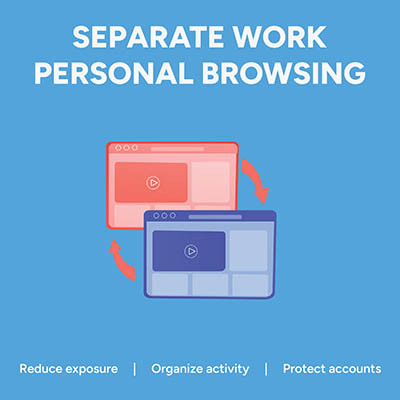
Picture this: an employee is logged into their personal Google or Microsoft account to check a personal email. In the very next tab, they open your company's cloud dashboard to edit a sensitive spreadsheet. It feels completely harmless, but in reality, that single overlapping browser session is a quiet source of data leaks, compliance headaches, and constant calls to your IT help desk.
That’s because if personal identities and corporate cloud accounts mingle in the same browser instance, the browser gets confused. It attempts to sync saved passwords, autofill data, browsing history, and extension permissions across both environments.
The fix is simple… enforce dedicated browser profiles for your entire team.

Managing hundreds of business accounts with complex, frequently changed passwords no longer protects your organization. In fact, forcing arbitrary symbol substitutions and constant resets creates predictable patterns that hackers easily exploit. Modern security relies on practical, long-term rules that safeguard data without slowing down daily work.

When cybercriminals try to break into a business, they rarely bother picking digital locks. Instead, they send a convincing email straight to someone on your staff. Treating your team like a security liability creates fear and keeps people from reporting suspicious activity.

When your team is trying to get things done, they will usually take the path of least resistance. Sometimes, that means bringing outside tools into your daily workflow without asking permission first.

When a small business starts out, file sharing usually happens organically through email attachments, personal cloud drives, and quick chat links. While that gets work done in the beginning, scaling a business on unmanaged file habits creates serious operational snarls and major security vulnerabilities down the line.
Modern cybercriminals have modified their attack methodologies. Rather than immediately encrypting production servers, sophisticated network intruders quietly target secondary file archives first to prevent organizations from performing independent data restoration. If your enterprise data protection configuration permits the modification or erasure of backup logs, a security incident can result in the permanent destruction of your operational records and force costly operational downtime.

Ransomware operations have matured into highly structured, sophisticated criminal enterprises. Data from global security incidents demonstrates that the vast majority of network compromises do not stem from complex, novel exploits. Instead, they occur due to basic operational gaps: unpatched software vulnerabilities, misconfigured network ports, or compromised user credentials. Once an unauthorized actor establishes a footprint within a network, they routinely spend days mapping corporate data and identifying connected systems before executing any encryption routines.
Picture pouring a bucket of water down a standard kitchen funnel. If you pour slowly, a drop at a time, the water flows smoothly through the narrow spout, but if you tip the bucket all at once, the water backs up, pools at the top, and eventually spills over the edges. For years, the Virtual Private Network (VPN) served as the corporate equivalent of that narrow funnel spout. It was designed for an era when data volume was small and entirely centralized—meaning all of a company's valuable digital assets lived inside a single, physical office server room.
A remote worker turned on their VPN, established a single encrypted tunnel back to the office firewall, and gained broad access to the local network.

There’s a misconception out there that younger workers, particularly Millennials and Gen Z, are more proficient with their technology compared to other generations. While they might have grown up using it, this experience doesn’t necessarily translate to proficiency. Assuming any one age group is more aware of cybersecurity is perhaps one of the most costly assumptions you can make.

According to an annual outage analysis from the Uptime Institute, power failures dominate corporate infrastructure disruptions, accounting for 45% of highly impactful outages. This is especially true within distributed edge IT environments like retail storefronts, logistics hubs, and satellite offices.
When a server or a critical networking component loses power without a controlled, graceful shutdown sequence, the operational losses are severe. Without an orderly shutdown, infrastructure components face specific risks. We’re talking about fried motherboard circuitry, storage degradation, and outright database corruption.

As a business owner, you probably manage hundreds of different digital assets, vendor relationships, and daily operational fires. Yet data security standards require you to navigate a complex matrix of cybersecurity rules just to let a customer swipe their card. If your business accepts Visa, Mastercard, American Express, or any other major credit card, you have likely run into a frustrating acronym: PCI DSS. It stands for Payment Card Industry Data Security Standard.
Let's look at this standard through the lens of a business owner and see why it actually matters.

Securing an office network used to mean setting up a perimeter firewall, enforcing user passwords, and assuming everything inside the building was safe. For years, that was standard practice. Today, that strategy fails to protect modern business operations.

I was talking to a dentist I know last month—let's call him Dr. Smith. Dr. Smith runs a great, busy practice, and he told me flat out: "Honestly, I don't stress about HIPAA audits. We aren't a massive hospital network. The regulators have bigger fish to fry."
It’s a comforting thought, but it’s completely wrong.

“Our systems are running okay right now. Let’s just wait and see how things go before we invest in upgrading our IT.”
Whenever we see this sentiment echoed in the small business community, our technicians break out in a cold sweat. The wait-and-see approach might seem fiscally conservative and responsible, but in reality, it’s anything but. It’s not a strategy; it’s unhedged financial liability.

Question: What would you think if you looked at your IT department’s queue and saw zero support tickets in the hopper? On the surface, this seems great—everything appears to be working, after all—but looks can be deceiving.
What if, instead of you having no issues at all, your reporting systems are too much of a hassle for your team members to utilize, and as a result, they have neglected reporting issues in favor of developing their own workarounds?
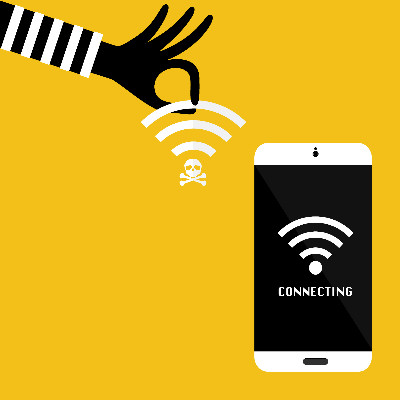
Connecting to a public Wi-Fi network is, at best, a roll of the dice, and more often than not, foolhardy and actively dangerous. Meant as a convenience, it is most convenient for someone trying to monitor your network traffic. These networks, maintained by a third party, are left wide open by design… making them in no way trustworthy, particularly for business purposes.

Checking a box on an insurance application used to be enough to get your business covered. Not anymore. Since cybercriminals have caused significant problems over the last few years, insurance companies are aggressively altering their rules to protect their own finances.

Artificial Intelligence is often framed as a productivity solution, but it has introduced a significant security risk known as shadow IT—specifically, shadow AI. This occurs when employees use unauthorized, public AI tools to summarize meeting notes, write code, or analyze spreadsheets without oversight from the IT department.
While the intent is usually to improve efficiency, employees often unknowingly upload proprietary company information to public databases.

Most “Acceptable Use Policies” are relics of the 1990s—ten-page legal documents filled with all kinds of “thou shalt nots” that employees sign once and immediately forget. Modern business requires a different approach. A lockdown policy drives your best talent toward implementing shadow IT solutions, or unapproved apps, and it creates a culture of resentment that ultimately holds your business back.
Our network audit will reveal hidden problems, security vulnerabilities, and other issues lurking on your network.
Learn more about what C3-Solutions can do for your business.
C3-Solutions
300 Kerby Hill Rd
Fort Washington, Maryland 20744