Have any question?
Call (240) 226-7055

Call (240) 226-7055

It is a common frustration when a workstation that once felt fast begins to lag. As you perform your daily tasks, the operating system collects digital baggage that interferes with performance.
You do not always need to spend money on new hardware to solve this. Often, the goal is simply to use the technology you already have in a more effective way. When a computer slows down, it is usually because the system resources are being stretched too thin by background processes and unnecessary files.

We’ve all been there: a deadline is looming, you’re in the flow, and suddenly your screen freezes, the Internet drops, or your printer decides it’s retired. It’s more than just a minor inconvenience; technology friction can derail your entire day and send your stress levels through the roof.

Every day, countless chats are sent between colleagues as they go about their duties. If your business uses Google Chat to send these messages, then you have the capability of scheduling chats for a later date. This neat little feature is hidden right in plain sight, too, so don’t feel bad about not seeing it. The question now is what are you going to use it for, and how do you schedule chats in the first place?

Cybersecurity is a topic near and dear to most business owners’ hearts. You might not specialize in securing your infrastructure, but it’s still a vital factor that cannot be ignored. Today, we want to cover how you can make cybersecurity as easy as possible for your team so they don’t accidentally put your business at risk.

Word processors are a part of office life, so it helps to know as much as you can about them. Today, we want to think about ways you can adjust text size, especially after you copy and paste content into a document. Not only will we cover how to do so as plain text, but also how to use keyboard shortcuts to increase or decrease text size and add special formatting without navigating clunky menus.

Do you ever feel like your PC is taking longer to boot up than you’d like? It might not be your imagination; it might actually be taking longer than it should. Today, we’ll go over how you can use the Event Viewer app to get an idea of how long it’s taking your computer to boot up, as well as what numbers you should aim for.

It’s the holiday season, so many people will be spending a lot of time online, likely seeking out the perfect gift for everyone on their list. Considering you’re reading this blog, you could be one of them. Do you have the perfect gifts in mind for everyone in your circle, but just can’t seem to find what you’re looking for?
Let’s go over some tricks that Google has baked into its search functionality, and how they could prove handy during your holiday shopping… and your workday, too!

You likely use basic shortcuts like cut, copy, and paste every day. While essential, these are just the foundation. To truly maximize your productivity and demonstrate peak efficiency, mastering a few advanced keyboard shortcuts is key.
Each shortcut may only save a few seconds, but over time, these moments accumulate into significant time savings. Ready to move beyond the basics?

Microsoft Excel is a powerful tool that businesses leverage every day to store, track, and report on data, but it can be tedious to work in the document without knowing all of its little tricks. Today, we want to share with you one that could save you valuable clicks and time spent copying and pasting values. You’ll learn how to enter the same data into multiple cells at once.

Even though it’s incredibly helpful, technology can be frustrating—sometimes to an absurd degree. Businesses can’t function without it, so they have to learn to live with it, but it doesn’t have to be hard. You can develop some habits by using these tricks to reduce some of the friction in your workday.

It can be too easy for anyone’s work desktop to become cluttered and filled with applications and windows, leading to a mess that gets in the way whenever one tries to accomplish anything. Chances are, you know exactly what I’m talking about. Wouldn’t it be great if there were a quick and easy way to clean up the desktop and just focus on the window you need to focus on?
If you agree, I have some good news.

Unfortunately, most people can relate to the feeling when you’re busy, but you really aren’t getting anything meaningful accomplished. Imagine a workplace where being busy actually means brilliantly productive. If that is the sweet spot you’re looking for, this blog is for you.

Being overwhelmed can happen to everyone, even the hardest workers you know. If you’re not careful, the weight of your agenda could drag you down and create more problems than it solves. While you could power through, this is usually counterproductive, and you’d be better served by taking a moment to step back, breathe, and perform a micro-reset.

Running a business today presents unique opportunities and challenges. For instance, safeguarding business information and systems—both physical and digital—is no longer just an IT department concern; it is fundamental to operational continuity and overall success.
The real question is whether or not you are prepared to deal with the threats you’re practically guaranteed to face.

Accessibility is a huge talking point in the world of IT. With modern technology solutions, accessible options are much easier to use and more inclusive, allowing workers to get their work done despite the circumstances. Today, we want to look at what the Windows operating system offers in terms of accessibility features.

Productivity is what fuels your personal or professional goals, and it’s easy to tie it into your self-worth if you’re not careful. It’s hard to be productive all the time, though. Today, we want to give you some actionable tips on how you can keep your productivity levels reasonably high.

Sometimes, one of the most effective ways to be productive is to step back for a moment. Consider how long a chess grandmaster will sit and stare at the board, planning the moves and maneuvers for the next seven turns.
So, to boost your productivity, approach your tasks like a chess grandmaster. Let’s discuss how to go about doing so.
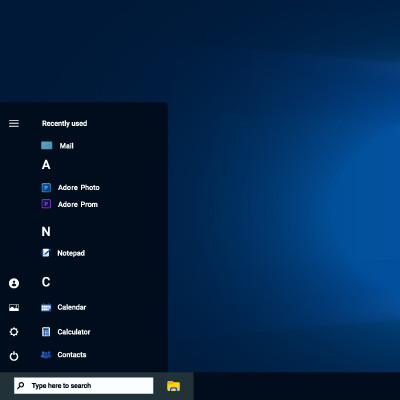
Windows 11 introduces a new look by centering the taskbar, similar to the style used in macOS. While some users may appreciate this fresh design, others might prefer the traditional left-aligned taskbar found in older versions of Windows.
Business cybersecurity is increasingly important for every organization in operation today, to the point where it could very well be the difference between your business’ survival or failure. While extensive things must be accomplished to ensure your overall business continuity, you have to start somewhere.
Let’s review some of the most essential things you can—and need to—do to keep your business secure.

The Android operating system offers a litany of additional features and shortcuts in most applications… all you have to do is long-press an application’s icon to pull up a contextual menu of shortcuts. Naturally, Google’s applications are no exception.
Let’s review some of Google’s application capabilities as they appear in these shortcut menus.
Our network audit will reveal hidden problems, security vulnerabilities, and other issues lurking on your network.
Learn more about what C3-Solutions can do for your business.
C3-Solutions
300 Kerby Hill Rd
Fort Washington, Maryland 20744